
A Family Passion Project — Free Forever

The game is out now and free on iPad, iPhone, Android, Mac, Windows and Linux. There is no account to create and no waiting list — pick your device below and play today.

It started with a simple idea: what if my son could experience the same world that captivated me decades ago? Ultima Online wasn't just a game — it was where I learned to trade, to explore, to trust strangers, and to never leave the bank without armor. I wanted to share that with him.

So I started building. Late nights after the kids went to bed. Weekends between soccer games and homework. What began as a father-son project quickly grew — my brother wanted in, then our friends, then their kids. Suddenly this little passion project had a community of its own.

UM Classic is an original, from-scratch client for the classic sandbox RPG era — rebuilt from the ground up for modern tablets and desktops, and designed to work with a classic client you already own. No server subscriptions, no ads, no in-app purchases, and no internet connection required once you're set up — though you can hop online with friends any time. Everything runs on your device, and playing offline or online is entirely your call.

play your way

UM Classic is offline-first — the entire game lives on your device. But when you want company, the same game seamlessly connects online. Three ways to play, one game.

🏠
Solo No internet needed. Your world, your pace. Explore, fight, craft, and build on your own. Saves stay on your device.
👥
Private Shard Host a game for family and friends. Invite who you want. Your own private Britannia, shared with the people you choose.
🌐
Public Shard Join our community relay server and adventure with players from around the world. No account needed — just connect and play.

one connected world

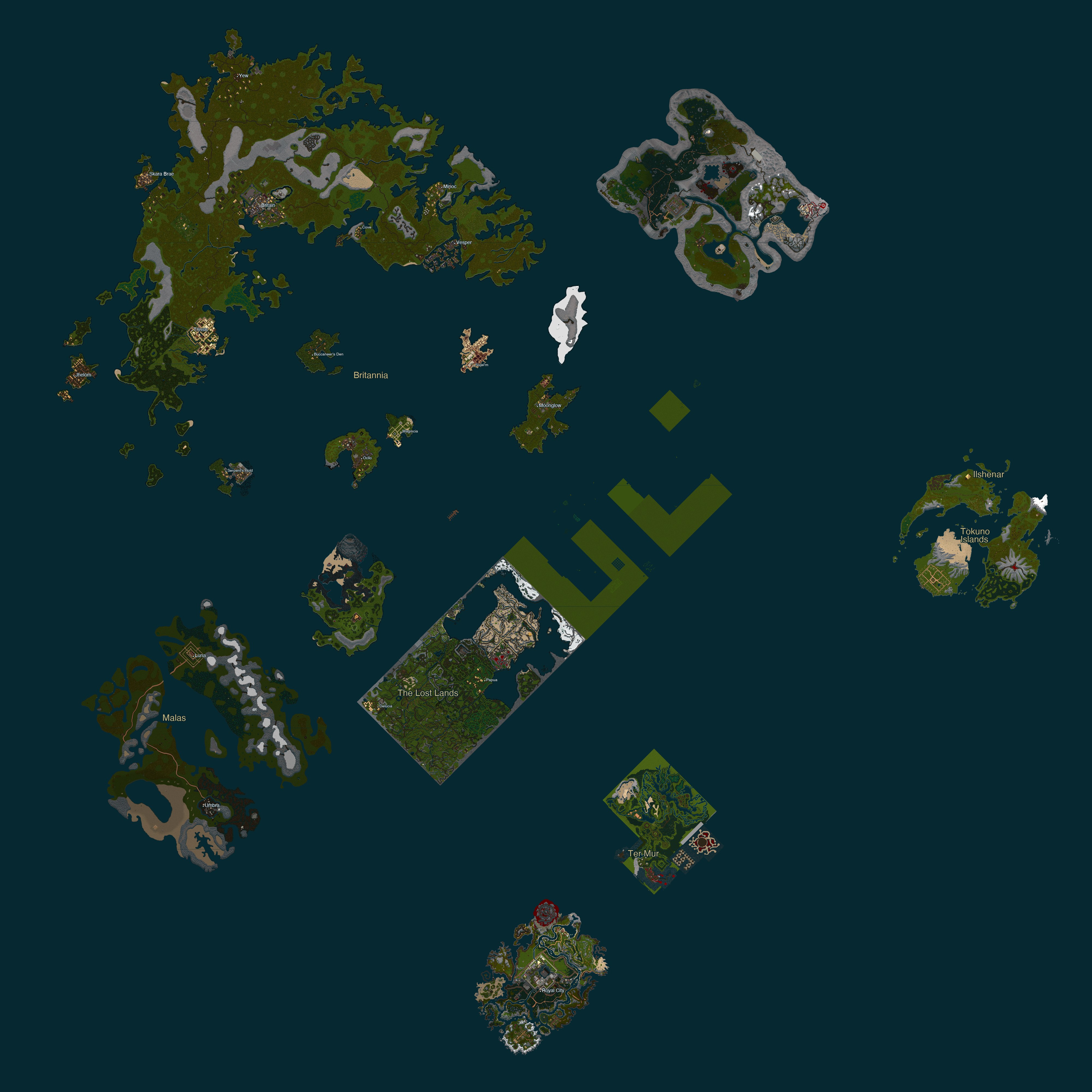
Unlike the original Ultima Online, where expansion lands were isolated in separate facets, UM Classic stitches every era together into one continuous world. Britannia, the Lost Lands, Ilshenar, Malas, the Tokuno Islands, and Ter Mur are all connected by open ocean. Sail between them by boat, hop a moongate, or recall with a marked rune — every land is reachable from any other.
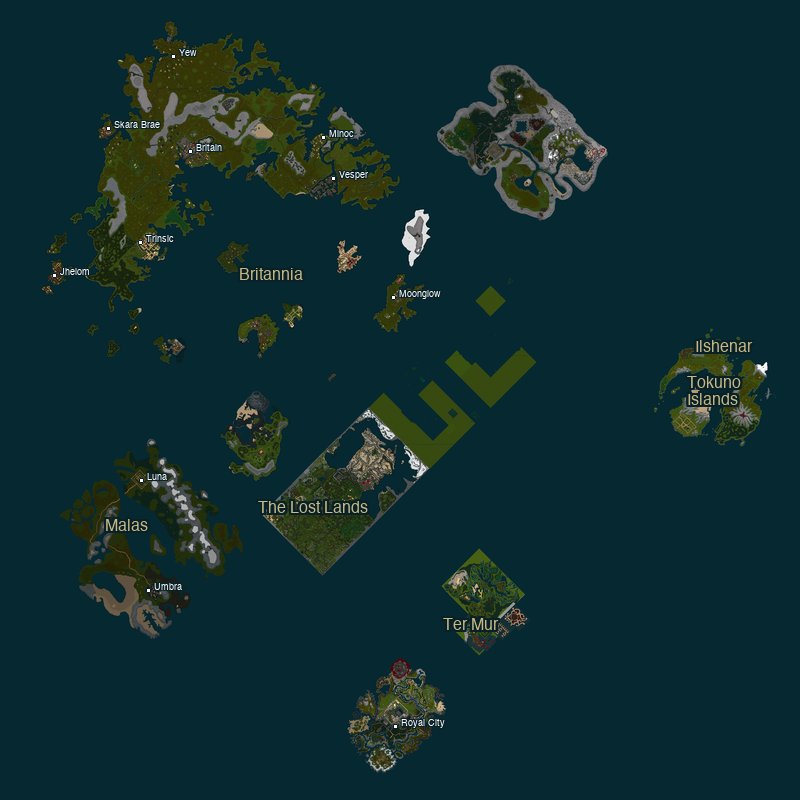
World Map of UM Classic — Britannia, Ilshenar, Malas, Tokuno, Ter Mur — all connected by open water Click to enlarge

what's in the game

This has been a passion project for a while now, and it grows every week. Here's what's playable right now.

Six Lands to Explore Britannia with all its cities and dungeons, the Lost Lands, the virtue shrines of Ilshenar, the dark continent of Malas, the Tokuno Islands, and the gargoyle realm of Ter Mur. All connected, all explorable.
15+ Towns & Cities Britain, Trinsic, Vesper, Moonglow, Yew, Minoc, Skara Brae, Jhelom, Magincia, Nujel'm, Serpent's Hold, Buccaneer's Den, Cove, Luna, Umbra, and more. Every town staffed with vendors, trainers, and quest givers.
11 Dungeons Deceit, Despise, Destard, Hythloth, Shame, Wrong, Covetous, Fire, Ice, Terathan Keep, and Solen Hive. Multi-level layouts with teleporters, traps, and treasure.
58 Playable Skills Every classic UO skill — Swordsmanship, Magery, Mining, Animal Taming, Blacksmithy, Hiding, Stealth, Musicianship, and dozens more. Train by use or push beyond with Power Scrolls.
7 Schools of Magic Classic Magery (64 spells), Necromancy, Chivalry, Bushido, Ninjitsu, Spellweaving, and Mysticism. Each with unique mechanics, reagents, and dedicated spellbooks.
Full Combat System Real-time melee, ranged, and magic combat. Weapon skills, armor ratings, special moves, poison, and war/peace mode toggling. Fight monsters or duel friends.
Monsters & Creatures From skeletons and giant spiders to liches, dragons, balrons, and sea serpents. Dozens of creature types with unique combat behaviors, loot tables, and spawn zones.
Complete Crafting Blacksmithy, Tailoring, Carpentry, Tinkering, Alchemy, Cooking, and Bowcraft. Colored ore and wood, crafter marks, tool durability, and recipe-based creation.
Resource Gathering Mine ore from mountain veins, chop wood from forests, shear sheep, fish the seas, and harvest reagents from the wild. Each resource feeds into the crafting system.
Player Housing Place a house in the world, lock down your treasures, and make Britannia feel like home. Houses persist across sessions and protect your hard-earned loot.
Animal Taming Tame horses, bears, wolves, and more. Your pets follow commands — follow, stay, guard, attack — and fight alongside you in battle. Pets persist across saves.
Moongate & Boat Travel Fast-travel by moongate between cities, recall to marked runes, or build a boat and sail the open seas between continents. The world is yours to cross however you choose.
Quest System Escort quests, bounty hunts, and exploration objectives. Talk to NPCs, accept missions, earn gold and karma. A quest log tracks your progress.
Vendors & Economy Buy and sell at NPC shops across every town. Weapons, armor, reagents, food, tools, spellbooks — each vendor specializes in their trade, just like you remember.
Bard Abilities Provoke monsters to fight each other, calm hostile creatures with Peacemaking, or weaken enemies with Discordance. Instruments have durability and your skill determines success.
Character Creation Choose from preset templates — Warrior, Mage, Ranger, or Crafter — or build a fully custom character. A guided tutorial walks new players through the basics.
Touch & Keyboard Designed from day one for Android tablets with full touch controls — tap to move, drag to equip, pinch to zoom. Equally at home on Windows with keyboard and mouse.
Always Updating New features, fixes, and content every week. This is a living project built with love, nostalgia, and way too much pink lemonade.

want to play?

UM Classic is now in early beta — it's free, it's playable, and it gets better every week. Expect bugs! We're still polishing, but the game is very playable. Open the Quick Commands menu in game and pick Report Bug — it captures a screenshot and your location automatically, which helps us fix things fast.

The game is live and free on Android (Google Play), Mac (Mac App Store), Windows, and Linux. iOS is live too, as a free public TestFlight beta rather than an App Store listing — same build, one extra tap to install. No accounts, no catches — just download and play. Feel free to share with your friends — all are welcome!

Join the community
Patch notes, bug reports, feature ideas, and help from other players — the whole conversation happens in our Discord.
Free to join. No account needed to read.
Open Discord
Support This Project
1Pick your device below — it is free, and there is no account to create.
2Install it. Each option opens short, step‑by‑step instructions.
3Confirm you own the original game on first launch. A one‑time data pack (about 1 GB) downloads — after that you can play offline or online, whenever you like.
UM Classic
iOS iPad & iPhone — free beta
TestFlight
UM Classic
Android Tablet — Google Play
Download
UM Classic
Windows Self-contained .exe — no install needed
Download
UM Classic
macOS On the Mac App Store
Get
UM Classic
Linux Portable .tar.gz — Ubuntu 20.04+
Download

Questions, or something broken? Get in touch — we read every message.

the story behind it

Ultima Online launched in 1997 and changed everything. It was the first true MMORPG — a living, breathing world where thousands of players built communities, ran shops, fought dragons, and made memories that lasted a lifetime. For many of us, it was more than a game. It was where we grew up.

UM Classic is our love letter to that world. It's not affiliated with EA, Broadsword, or Origin Systems — just a fan who wanted to share something magical with his family. Every pixel, every line of code, every late-night debugging session is fueled by nostalgia, love, and way too much pink lemonade.

We give full credit and gratitude to Richard Garriott, Origin Systems, and everyone who built the original Ultima Online. Without their vision, none of this would exist.

latest update

Sep 18, 2026 — v1.1.5: the forge that was not a forge

Randall wrote in: he could not smelt iron ore standing next to a forge, and had tried many times. He was standing next to one. The game held two separate lists of what counts as a forge, and smelting was reading the shorter one — the one without the large forges, which is the kind every town smithy has. Pulling that thread turned up three more things that were built and never connected to anything.

Bugs squashed

New

Changed

Windows, Linux and Mac are ready to download now. Android is going out through Google Play, and iPhone and iPad through TestFlight.

— Steven ⚔️
View Previous Updates (22) ↓

update history

×

previous update

Sep 18, 2026 — v1.1.4: put the thumbstick where you want it

A player wrote in asking whether the thumbstick could be moved for a left-handed grip. The honest answer was no, and the more interesting question was why it had to live in one corner at all. So it does not any more: you pick it up and put it wherever it suits you, and everything attached to it follows.

New

  • 🎮 Move the thumbstick anywhere on the screen. There is a small padlock beside it. Hold it for a moment, a ring fills, and the pad goes quiet and fades back — it will not walk your character while you are placing it, because a control whose whole job is to absorb your thumb cannot be dragged while it is still listening. Drag it wherever you like and hold the padlock again to set it down. It stays there between sessions, and it remembers per character.
  • 🥋 Left hand or right, without a setting. There is no handedness option to find, because there does not need to be one. Drag the pad to the other side of the screen and your quick slot ring, the action button and the padlock all swap over with it, so nothing ends up off the edge and the ring still curves into open screen instead of into the corner.

Bugs squashed

  • 👤 The Import button was sitting on top of New Character. Import arrived last release for people restoring a backup onto a fresh install. It was drawn over the top of whatever screen you were on, and on the character list that put it squarely over the New Character button, where it stole the tap. It now appears only in the one place it was ever needed: a new install with no characters yet. The character list has always had its own Transfer button for the same job.
  • 📥 The first-run download stalled at 0 MB for some players. Two reports, one on an iPhone and one on Android, both stuck at zero with plenty of space free. The game data is served from a separate download host, and some networks will not open a secure connection to that host at all — a hotel portal or a filtered connection will do this. The download now notices that particular failure and fetches the data through the website instead, which those networks do allow.

Windows, Linux and Mac are ready to download now. Android is going out through Google Play, and iPhone and iPad through TestFlight.

— Steven ⚔️

previous update

Sep 16, 2026 — v1.1.3: ladders, and riders who never swung

A batch of sixteen reports, most of them from people who had been living with the problem long enough to describe it precisely.

Bugs squashed

  • 🧱 Dungeon entrances spat you back out to the surface. A ladder has a top and a bottom and nothing in between, and the code was looking for a middle that does not exist.
  • 🐴 Mounted fighters never swung. The sound played and the damage went out, but the rider sat still through the whole fight.
  • 👕 Your robe was destroyed when you died, and gear recovered from your own corpse could not be put back on.
  • Healers charge nothing to resurrect you. They were asking for gold.
  • 🏠 Monsters could hit you through your own house walls.
  • 📜 Runes stopped stacking into each other, so a rune to one place no longer swallowed a rune to another.

Changed

  • 📦 Sorting a bag packs it tighter, fitting more on every page.

— Steven ⚔️

previous update

Sep 15, 2026 — v1.1.2: one button for the thing you are doing

Most of this release came out of one question from a player who wanted to use a controller. Thinking about how you would play with two buttons instead of ten fingers turned out to be a good way to find everything that took too many taps. Then somebody asked for a "harvest" button, somebody else asked why their bag was always a heap, and a third person lost a house to a factory reset. Those three things are the release.

New

  • 🎯 One action button, and it knows what you are doing. It sits beside the joystick and changes with the situation. Draw your weapon and it turns red: tap it to cycle through the things attacking you, ordered nearest first, so you can count taps without looking. Put an axe or a pickaxe in your hand and it turns green, and tapping it finds the nearest tree or vein and starts swinging. Use a skill and it turns blue with that skill's name on it, ready to run it again. Double tap anywhere on the joystick pad to repeat whichever of those you are in the middle of. When there is nothing to act on it disappears entirely, so it is never in the way.
  • 🧺 Harvesting picks up where it left off. Gathering has always stopped on its own when a vein runs dry, when you step away, or when your character pauses for breath. Getting back to it meant digging the tool out of your pack and landing a fingertip on one tile of a tree. Now the green button finds the node you were last working, or the nearest one your tool can use, and carries on.
  • 📦 Hold a bag to tidy it. Press and hold anywhere on a backpack, chest, trunk or bank box that is not an item. A ring fills under your finger, and the contents lay themselves out on a neat grid. Anything that does not fit goes in a pile at the bottom, and holding again brings that lot up and sends the current lot down. Nothing is locked in place: everything can still be dragged wherever you want it.
  • 💾 Saving a character now saves what it owns. Transfer has always carried your character, skills and everything in your pack. It did not carry your buildings, which lived somewhere else entirely, so a player who backed up and then reinstalled got their character back and found their house gone. It now carries your houses, ships, vendors and the furniture standing on your floors, and puts them back when you import.
  • 👤 Import a character without making one first. On a fresh install the game went straight to character creation, so restoring a backup meant inventing a character you would only delete. There is an Import button on the title screens now.

Housing

  • 🏠 Own as many houses as you like. The limit was one. It is gone.
  • 💰 Deeds can be paid for from your bank. A villa is 228,500 gold and a castle is over a million, and until now you had to be carrying all of it to talk to an architect. House and ship deeds come out of the bank box now. Everything else is still paid for from your pack, as it should be.
  • 💀 Monsters cannot follow you inside. Walls have always stopped them. Doorways had not, so anything chasing you could simply walk in after you.

Bugs squashed

  • 💬 Chat could crash the game, and could not send a message. The keyboard's own send key was throwing the message away instead of sending it, and there was no send button. Behind that, closing the keyboard called itself in a loop until the game fell over. Both fixed, and the message you are typing now sits above the keyboard instead of at the top of the screen.
  • 🗺️ The world map dragged the frame rate down. It was drawing the whole world into memory no matter how little of it you were looking at. It now works only on the part you can see, and skips detail too small to make out.
  • 📜 Setting a skill to lower or locked would not stick. It reset the moment you looked away, and only on skills you had never trained, which is exactly the set you would want to turn down.
  • 🔁 System messages appeared twice. Switching character left the previous one still listening, so everything the game told you was said once per character you had played that session.
  • 🗑️ Saving a character to a file could freeze the game. The write was happening on the same thread that draws the screen, so a save to a cloud folder stopped everything until it finished.
  • 🔍 Stray taps opened people's health bars. Steering with the joystick was being read as a drag out in the world, so stat bars kept appearing on their own while you were just trying to walk.

Changed

  • 📥 The first-run download is quicker and far less likely to stall. It used to fetch 172 files one after another, most of them tiny. It now fetches several at once and collects the small ones together, which is about a dozen requests instead of 172.
  • 🔍 Bigger buttons and clearer icons. The action button and the quick slot icons around the joystick were too small to read at a glance. The icons were the worse of the two: they were being drawn to fit their artwork, and most UO item artwork is mainly empty space, so a bandage was showing at a third of the size it had room for.

Windows, Linux and Mac are ready to download now. Android is going out through Google Play, and iPhone and iPad through TestFlight.

— Steven ⚔️

previous update

Sep 11, 2026 — v1.0.109: the rescue that made it worse

A player got dropped somewhere he could not walk back from, and did the sensible thing: he used the command built for exactly that. Nothing happened. He filed the same report sixty-five times, which is a fair measure of how that felt. He was right, and the cause was worse than a rescue that simply failed — the rescue was sending people to a spot that is not on the map at all. Chasing it turned up a house that had been swallowed by a mountain, and a fishing pole nobody could pick up.

Bugs squashed

  • 🧭 Unstuck left you worse off than before. When it could not find dry land near you it fell back to a fixed spot meant to be the Britain bank — except that spot was written down before the world was stitched together, and it now points at open nothing north of the map. So the one command for getting unstuck was quietly moving stranded players somewhere genuinely empty. It brings you to the bank now, and it will refuse any destination that is not really there. (reported from Android)
  • 🏠 A house placed on a mountain disappeared, and took the deed and the gold with it. Placement only ever checked for things standing in the way — trees, walls, rocks. A mountain is the ground itself, so it passed, and the house was built at the mountainside's own height: buried in the hill, invisible, unenterable. The deed is spent at that moment and the gold had already gone to the architect. Houses now need level, dry ground, and the green box you aim with tells you the truth before you commit anything. (reported from an iPad)
  • 🎣 You could not hold a fishing pole. It could be bought, crafted two different ways, and handed to you when you started — and it could not be equipped, so fishing was impossible. Worse, the game said "Fishing pole equipped" and then did nothing. While fixing it we found the shovel had the same problem, which nobody had reported: you could buy one to mine with and never be able to hold it. (reported from a Mac)
  • 🐬 Dolphins were swimming on dry land at Moonglow. They were, and checking the other two pods turned up Jhelom doing the same thing without anyone having mentioned it. Both are back in the water. (reported from a Mac)
  • Android offered to close the game while your character was still loading. The load was taking a third of a second longer than the five seconds Android allows before it decides an app has hung. It is comfortably under that now, and the loading screen keeps moving the whole way through instead of sitting frozen. (reported from Android)

Changed

  • 📥 World updates download in about a fifth of the time. The file is sent compressed now — 18.7 MB became 2.9 MB — so the pause when the world changes is a few seconds rather than a couple of minutes.

Windows, Linux and Mac are ready to download now. Android is going out through Google Play, and iPhone and iPad through TestFlight.

— Steven ⚔️

previous update

Sep 10, 2026 — v1.0.100 to v1.0.102: power scrolls that stayed spent, and houses that work

A player wrote in to say his Meditation kept sliding back to 100. He was right, and it was worse than it looked: the game had been saving the correct number all along and throwing it away on the way back in, then writing the smaller one over the good save. Chasing that turned up a house deed that built a boat, and treasure maps that had never really worked at all.

Bugs squashed

  • 📜 A skill above 100 dropped back to 100 every time you loaded. Your save was right the whole time. The load was discarding anything past the ordinary cap, and the next autosave then wrote that loss back over the good save, so it compounded instead of being something you could reload out of. Only power scrolls take a skill past 100, which is why nobody hit it until people started using them. (reported from Android)
  • 🏠 A two-story house deed built a small boat. Nineteen house deeds share their artwork with other scrolls and deeds, and three of them were being read as the wrong thing entirely — the two-story house as a ship. It did not fail and tell you; it quietly built the default boat and took your 96,000 gold. All nineteen build the right house now. (reported from an iPad)
  • 🗺️ Treasure maps did nothing. Every time you opened one you got a fresh blank chart, so decoding one and then digging it was impossible. Message-in-a-bottle maps and the dragon's-hoard chart arrived already decoded and lost their location on the first tap. And two maps of the same level merged into one in your bank, taking a dig site with them. A decoded map now stays decoded, and survives closing the game. (reported from an iPad)
  • 📦 A chest you crafted would not open once you put it down. Nor would crates, boxes, pouches or bags. In your pack they worked, which is what hid it. Ones you have already made will start working on their own. (reported from an iPad)
  • ⚔️ You could hold a sword and a heavy crossbow at the same time by double tapping them, and combat could not decide which one you were actually using. A two-handed weapon takes both hands now, whichever way you equip it. A shield still pairs with a sword as it should. (reported from an iPad)
  • 👥 Monsters disagreed between devices when playing together. Every device was running its own copy of every creature's mind, so the same mongbat wandered somewhere different on each screen. One device runs them now and the rest are shown the result, and if that device goes quiet the others keep the creatures moving until it comes back. (reported from an iPad and an Onn tablet)

Changed

  • 🏷️ The tutorial lets go now. Skip Guide was a tiny target tucked in the corner and it was the only way out, so a fair amount of "the tutorial will not leave me alone" was really "I cannot hit that button". It is a proper button now. And if you ignore a step long enough it warns you, then steps aside on its own and leaves a Tutorial button in the top left to bring it back when you want it, or an X to send it away for good. Your place is kept either way.

Added later the same day

  • 🏠 Houses are real buildings now. Every deed was putting up the wrong house — a two-story deed built a small plaster cottage, and five deeds built nothing at all. All nineteen are corrected against the game's own data. More to the point, you can go inside: houses now have floors you stand on, walls that stop you and a door that opens. (reported from an iPad)
  • 🔒 Chests in your house can be secured. Say "I wish to secure this" and target a chest — what is inside becomes yours and your co-owners' alone. Locking an item down stops it being carried off; securing keeps the contents private. Houses still never decay.
  • 📥 The first download needs far less room — 1.6 GB free instead of 2.5 GB. It used to need space for the packed file and everything inside it at once; now each piece goes straight where it belongs. If it stops partway it picks up where it left off, and a lost connection costs one file rather than the whole download. This is the one several of you reported as running out of space on a device with plenty. (reported from Android)
  • 🧥 Dragging clothes or a weapon onto your character often landed on the slot above the one you aimed at, refused it, and said nothing at all. The boxes are hit properly now, anything wearable dropped anywhere on your character goes where it belongs, and something you genuinely cannot wear says so. (reported from Android)

Windows, Linux and Mac are ready to download now. Android is going out through Google Play, and iPhone and iPad through TestFlight.

— Steven ⚔️

previous update

Sep 7, 2026 — v1.0.99: the shopkeepers who were never there

A player mentioned the house deed seller looked to be missing. He was right, and checking properly turned up five more trades that had never existed anywhere in Britannia. Then a new player wrote in, and it got worse: on a phone or tablet you could not finish making a character at all.

New

  • 🏦 Thirty-six shopkeepers who were missing are now open for business. The architect sells house deeds and stands with the carpenter, so in Britain you will find him at The Saw Horse. The sage sells power scrolls and keeps to the magic shops. There is a veterinarian at every stable, a fur trader with every tanner, and a cobbler, glassblower and mapmaker among the tinkers. Every one of them was written and priced long ago and simply had nowhere to stand, which means their whole stock was unbuyable. (reported from the Discord)

Bugs squashed

  • 🚪 You could not finish creating a character on a phone or tablet. The button to confirm your starting city sat just off the bottom edge of the screen. On a computer you could press Enter instead, which is why it went unnoticed. On touch there was no way past it at all. (reported by a new player)
  • 📜 The skill list would not scroll during character creation on touch, so you saw ten of the fifty-nine skills, under a note telling you to scroll. You can drag the list now. (reported by a new player)
  • 🐎 Your pets ignored you on phones and tablets. Ride, Feed, Follow Me, Stay, Stable, the whole menu, was unreachable, so you could tame a horse and never sit on it. Pressing and holding your own horse targeted it for a fight instead. It opens the pet menu now. (reported from an iPad)
  • 👥 The Followers count always said 0/5 no matter how many animals you had tamed. It counts them.
  • 🔒 Skill locks did nothing and forgot themselves. Setting a skill to lock or to fall was only ever a picture: the game never read it, and every arrow reset the next time you opened the app. They stick now, and they do what they say.
  • 🔮 A recall rune bought from a mage could not be marked. Cast Mark, tap the rune, and it told you to cast Mark. Runes you already own work too.
  • 📊 The status bar could not be moved once you shrank it to the three small bars. Every attempt to drag it opened it back up.
  • 🏃 Running looked wrong. Your legs were slower than your feet, so the character skated along. Everything is in step now, and a touch quicker than the old game while it is at it. (reported from a MacBook Air)
  • 🛡️ A Report Bug button on the starting city screen. The player who found the blockers above had no way to tell us, because the report button only exists once you are already in the world. If you get stuck before that, there is now a button right there.

This one also carries the fixes from 1.0.98, which went out quietly last week: players were being thrown out of sunken dungeons every couple of seconds, and a number of dungeon teleporters were dropping people in the wrong place or in the water.

Windows, Linux and Mac are ready to download now. Android is going out through Google Play, iPhone and iPad through TestFlight, and the Mac App Store as well. The shopkeepers do not need the update — they arrive on their own the next time you open the game.

— Steven ⚔️

previous update

Sep 3, 2026 — v1.0.96: the mountains push back

A player wrote in to say he was running around on top of a mountain. He was right, and it turned out almost none of the rock in Britannia had ever been solid.

Bugs squashed

  • ⛰️ You could walk straight up a mountain. Only a sliver of the rock in the world was ever solid and the rest let you stroll over the top of it. Cliffs stop you now. If you happen to be standing inside one when you update, the game walks you back down rather than leaving you stuck. (reported from an iPad)
  • 🎒 Your backpack was stacking items on top of each other on phones and tablets, so the thing you tapped was not always the thing you got. One player bought a horse and kept opening a sewing kit instead. The bag lays out properly now, and anything that was buried gets moved into the open the first time you load. (reported from an iPad)
  • 💾 Re-downloading the game data could fail right at the end and blame your free space on a device with 26 GB going spare. Wrong reason, and retrying could never have worked. It was the game holding one of its own files open while trying to replace it. Both halves are fixed, and when something does go wrong it now tells you what actually happened. (reported from Android)
  • 🧔 The beard picker was offering the wrong beard under three of its seven names. Your character has not changed. The labels were wrong, not the beards.

Windows, Linux and Mac are ready to download now. Android is going out through Google Play, iPhone and iPad through TestFlight, and this time the Mac App Store as well.

— Steven ⚔️

previous update

Sep 1, 2026 — v1.0.91: see how many others are playing

Playing alone and playing alongside two hundred people look exactly the same from the outside. This one makes the difference visible.

  • 📊 The front page now shows how many people are in the game right now. Not visits to the site — people actually playing, at that moment. When nobody is on it shows nothing at all, because an empty box says the opposite of what it is there for.
  • ⚙️ What the game reports. Your version and your device type. That is the entire list. Never your name, never your character, never where you are in the world.

Bugs squashed

  • 💾 A device low on space said the download had failed. It read as a broken download when the real problem was room on the device, so the obvious fix — try again — could never work. It now tells you how much space it needs. (reported from Android)

Windows, Linux and Mac are ready to download now; Android is going out through Google Play, and iPhone and iPad through TestFlight.

— Steven ⚔️

previous update

Aug 31, 2026 — v1.0.88: your characters can travel

You asked for this one. Play on the tablet in the evening, the phone at lunch, and have it be the same character.

  • 🔄 Your characters can move between your devices. Three ways, so one of them always works. Save a character to a file and put it wherever you keep files (iCloud, Drive, Dropbox, anywhere). Or ask for a short code like WOLF-SAGE-42 and type it on the other device. Or just point the other device's camera at the code on screen: the game opens straight into it and starts collecting. Nothing of yours is stored on my server; the code is a courier that holds the handover in memory for fifteen minutes, gives it up once, and forgets it.
  • 👥 Send a character home and it simply updates. The game recognises the character itself, not its name, so a character that goes to the phone and comes back in the evening stays one character. No shelf of numbered copies.
  • 🔒 It will not overwrite something newer. If you played on both devices since they last spoke, it keeps both and tells you, rather than quietly throwing away the day you did not expect to lose.
  • 💡 The screen stays awake while you are playing. It used to dim and lock while you were reading the guide or thinking about a trade. There is a switch in Options if you would rather protect the battery.
  • 📱 The game fits a phone now, not just a tablet. This was built on an iPad and it showed: on a phone everything was laid out for a screen three times the size and then shrunk to fit, so the text came out small and the windows tiny in the hand. Windows now open as large as they will actually fit on the screen you are holding, so a phone gets big, readable text instead of a miniature of a tablet. There is also a UI size slider on the Interface tab, and it applies as you drag so you can see what you are choosing. Text on desktop and tablet is larger and better spaced too.

Bugs squashed

  • 🏹 Magic Arrow was showing Night Sight's candle on the hotbar. The two icons are stored the wrong way round in the original art, and the game was trusting the order. (reported the same morning it was fixed)
  • 🚫 The game could get stuck after you switched away and came back (Android). You would return to a huge pointer over a black screen, taps landing on the wrong buttons, and force-closing was the only way out. It was losing its drawing surface to the background and never fully picking it back up.
  • ✍️ Character Creation ran its buttons off the bottom of the screen on larger windows.
  • 📖 Pages in the getting-started guide overlapped each other, with the class descriptions running into the next heading.
  • 🎟️ Eleven dungeon teleporters dropped you into a loop you could not walk out of. Ten are fixed, and already on your device through world data.

Windows, Linux, Android and iPhone/iPad have this build. Mac follows shortly.

— Steven ⚔️

previous update

Aug 29, 2026 — v1.0.75: the game keeps itself up to date now

This one is mostly about a promise the game has been quietly failing to keep.

  • 🔄 World fixes now actually reach you. When I correct something in the world — a shop with the wrong keeper, a building nobody could get into — that fix is meant to arrive on its own, without waiting for a new version of the app. It never has. The game downloaded the update and then threw it away again the next time you opened it, every single time, so the same fix kept arriving and kept vanishing. Worse, while that was happening the game could believe it had the newest world when it did not, and the online shard would turn you away. It now checks and installs during the “Updating world data” screen at startup, before anything else loads. Your houses, your locked-down items, anything you have built or placed are kept — the update only replaces the world itself.
  • 🔊 Sound works on a brand new install. The game set up its audio before the game data had finished downloading, found nothing to play, and never looked again — so a first-time player had a completely silent game until they closed and reopened it. That is the “no sound” some of you reported, and why restarting seemed to fix it.
  • 📱 Sound works on iPhone. The game was asking iOS for the kind of audio the ring/silent switch turns off, so if your ringer was flipped to silent you heard nothing at all. iPads have no such switch, which is exactly why it took one of you to find it.
  • There is a loading screen on iPhone, iPad, Mac, Windows and Linux now. Only Android ever had one. Everywhere else you got a black screen while the game started, which is fine when it is quick and alarming when it is not.
  • 📥 The first-time download survives a sleeping screen, and when it does fail it now tells you why and how far it got, instead of the same message every time. It also reports the problem to me automatically — the Report Bug button sits behind that screen, so the people hitting it were the very people who could not tell me about it.
  • 💰 The Jhelom bank has a banker again. He had wandered across town and was standing outside the Counselor's Guild, leaving the jeweller on his own at the bank. Every other bank in Britannia has its banker within a few paces; Jhelom's was ninety. (Reaper)
  • 🔢 The version now shows on the character select screen, bottom left, so it is possible to tell at a glance what you are actually running.

Windows, Linux, Mac, Android and iPhone/iPad all have this build.

— Steven ⚔️

previous update

Aug 26, 2026 — v1.0.67: undoing something I should not have changed

A short one, and an apology in the form of a fix.

  • 📱 Closing a window by tapping it three times works properly again. Two releases ago I stopped that gesture firing on buttons you were actually pressing — which fixed the skill locks, but also meant the character and status windows, which are almost entirely made of buttons, could only be closed by their outer frame. Neither of those has an X button, so that made them genuinely awkward to get rid of. The skill locks are still fixed; only the Skills list is exempt now, instead of every window in the game. I changed something shared to solve one problem, which is exactly the kind of thing you do not do to a game people are already playing.
  • 🎯 The Target button has moved down beside the movement stick, level with the Peace/War button, instead of floating in the middle of the screen with nothing to relate to.

Windows, Linux and iPhone/iPad have this build. The Mac App Store version catches up next week.

— Steven ⚔️

previous update

Aug 26, 2026 — v1.0.66: Android updates that actually arrive

Android only this time, and all of it is about one thing: getting updates to you at all.

  • 📶 The Android download is about nine times faster. The game was using Android's built-in networking, which is fine for small requests and poor at pulling down something the size of the game data. Measured on a Samsung tablet, same Wi-Fi, same file: 3.5 megabits before, 32 after. First-time setup went from over half an hour to under four minutes.
  • 📦 The Android app is now 66 MB instead of 978 MB. It had been carrying the game art twice over — once packed inside the app and again unpacked onto your tablet, about 3.3 GB of space for 1.6 GB of data. It now downloads the art once, the same way the iPhone and Mac versions already did. If you already have the game, nothing is re-downloaded: your data stays exactly where it is and the update just gets a great deal smaller.
  • 🔍 Why this matters more than it sounds. Updates that size were quietly not arriving. One of our own tablets sat three days and three releases behind, plugged in, with 90 GB free. Nearly two thirds of the bug reports we receive turn out to come from a version that is already behind — which is why some of you have reported things that were fixed weeks earlier. This is the fix for that, and it is the reason this release exists.

Windows, Linux and iPhone/iPad get this build too. The Mac App Store version is unchanged for now — it went out yesterday and will catch up next week.

— Steven ⚔️

previous update

Aug 25, 2026 — v1.0.65: the skills window was fighting you

Mostly one window, which turned out to be working against you in three different ways at once. Two of these arrived from the same player in the same evening.

  • 🔒 The Skills window closed when you tried to change a lock. Setting a skill to raise, lower or locked takes two or three taps on the same little arrow — and tapping three times in the same spot is also how you close a window on a tablet. The close gesture was winning. It now ignores taps that land on something you are actually using, and the arrow has a far bigger target, because it sat right on the edge of the scroll where fingers naturally miss. That close gesture was a trap on every window with a control you tap more than once, not just this one. (Sno)
  • 📜 Scrolling the skills list threw skill cards everywhere. Dragging a skill name onto the screen makes a shortcut card, and the window decided that was what you meant the instant your finger moved at all — so a swipe pulled cards out instead of scrolling, and which way you swiped changed what you got. Up and down are the same gesture now: swipe to scroll, pull sideways to make a card. The list also jumped mid-scroll, because starting a swipe on a category heading collapsed the whole category out from under you. (Sno)
  • 🏰 Stuck on the castle roof. The top of Britain Castle is one flat level with no step down anywhere along it, so once you were up there, you were up there. /unstuck was no help either: it looks for somewhere safe at your own height, and up there it found more roof. It brings you back down to the ground now. (Grimm Ravenclaw)
  • ⚔️ The Bushido and Ninjitsu ability book did nothing whatsoever. Not one control in it worked — choosing an ability, using it, turning the page. It looked entirely normal, which is the worst kind of broken. Nobody had reported it; it surfaced while chasing the skills window. "Dig Here" on treasure maps was dead for exactly the same reason, so treasure maps are usable again too.
  • 📱 The character screen now tells you when a newer version is out, and where to get it. Several reports this month were things fixed weeks earlier, and there was no way for anyone to know. iPhone is supported now, not just iPad.

Quick Commands → Report Bug attaches a screenshot, your location and now your version automatically. Two of the four fixes above came from one player pressing it twice in an evening.

— Steven ⚔️

previous update

Aug 24, 2026 — v1.0.63: your pack was full of nothing

One fix, but it had been quietly ruining inventories for a long time and nobody could quite put a finger on it.

  • 🎒 Reagents weighed far more than they should — and so did arrows, bolts, bandages, boards, hides and leather. Anything bought from a vendor was handed a default weight of one stone per item, whatever it was actually supposed to weigh. You buy reagents a hundred at a time, so a single restock of all eight was adding eight hundred stones against a carry limit of under four hundred. That is why your pack felt full when it plainly was not. If you are already loaded down with them the weight corrects itself the moment your character loads — you do not need to drop anything or buy it again. (Dash Darklighter)
  • ⚖️ The same fault ran the other way too. Armour and weapons bought from a vendor weighed almost nothing — a plate chest is meant to be fifteen stones and was one. New purchases now weigh what they should. Gear you already own is deliberately left alone, because quietly making your armour heavier could leave you rooted to the spot and unable to move.

Worth admitting: this is the third time this exact fault has been fixed. Twice before it was patched precisely where it was reported — first gold, then reagents. This time every purchasable item in the game was checked against what it is supposed to weigh, and sixty-nine of them were wrong. Same mistake as the crafting run a few days ago: fixing what was named instead of the whole category.

Quick Commands → Report Bug attaches a screenshot and your location automatically. Three releases this week came out of that button.

— Steven ⚔️

previous update

Aug 23, 2026 — v1.0.61: the spellbook, and a player trapped underground

Six more, all from reports sent in this week. Android, Windows, Linux and Mac are live now; iPhone and iPad are going out through TestFlight.

  • 📖 The spellbook wouldn't take scrolls. You dropped a scroll in, the book showed the spell, and casting still told you that you didn't have it. The game was checking a different spellbook from the one you'd written into — it remembered the first book it ever saw and never looked again, so once that memory went stale nothing you inscribed counted. Reported three separate ways in one afternoon, seventeen times in total. (Dash Darklighter)
  • Trapped underground, and the rescue made it worse. He spent his evening wedged in a cave. The rescue that's meant to free you was moving him one tile — into the wall he was already stuck against — and then doing it again every twenty seconds, forever. It now looks for somewhere you can genuinely stand, and /unstuck will take you back to Britain if there's nowhere closer. (Dash Darklighter)
  • 🧥 Armour that wouldn't go on. Some pieces just refused to leave the bag, with nothing on screen to say why. It turned out half the wearable items in the game — every hat, most clothing, all the jewellery, boots — could get into a state where the game no longer knew where they belonged on your body, with no way back. Fixed for all of them at once rather than one at a time. (Knightreaper)
  • 📜 The starter guide told you the wrong thing. It said to tap your dagger to pick it up. Tapping stopped picking things up a good while ago — it selects now, and you press and hold to pick up — so following the instructions exactly left you stuck on that step with no way past. Not a broken dagger: a broken sentence, in four places. (Knightreaper)
  • 💰 Splitting a stack in the bank did nothing. Hold a pile of gold, choose how much to take, tap confirm — and the dialog would close having moved nothing and said nothing. (Radask)
  • 🔍 Reports now record your version and what the game was doing. Not a fix you'll see, but the one that will make the rest faster.

One ask. Two of this week's eight reports were things already fixed weeks ago — the crafting ones, from someone still on 1.0.56. If your game hasn't updated itself, please give it a nudge. Reports now carry the version, so we can tell straight away whether something is new or just hasn't reached you yet.

Quick Commands → Report Bug attaches a screenshot and your location automatically. Every single fix above came from one.

— Steven ⚔️

previous update

Aug 21, 2026 — v1.0.60: the whole crafting category, finally

Seven from your reports, plus five buttons that turned out to be connected to nothing at all.

  • 🧤 Cut leather, and boards. Skinning an animal gives hides, every piece of leather armour is made from leather, and nothing in the game turned one into the other — so a tanner could never make a single piece of armour. Logs never became boards either, which quietly made the whole of carpentry uncraftable. The same complaint had come back three times, so this round the entire raw-to-refined category got audited instead of just the part that was reported. (Shadow Lance G M)
  • 👗 Cutting cloth from the cloth side. Ore, logs and hides all convert by double-clicking the resource; cloth was the last one that only worked from the scissors. (Radask)
  • 💰 Gold weighed a stone per coin. Gold paid to you by a vendor was heavy while the gold you started with wasn't — so selling things made you heavier, which is how players ended up overweight with an almost empty bag. Characters already carrying heavy coin are repaired when they load. (Shadow Lance G M)
  • 📜 Skill cards couldn't be deleted on a touchscreen. Removing one was right-click only, and a touchscreen has no right button. Hold a card for a moment to remove it. (Shadow Lance G M)
  • 📓 The Skills window reopened as a closed scroll once you'd minimised it, with no obvious way back for the rest of the session. And the stablemaster insisted you had no pet while you were sitting on your horse. (Shadow Lance G M)
  • 📌 Five context-menu options were wired to nothing: Open Paperdoll, Open Backpack, Attack, Pick Up and Split Stack. Found by audit this time rather than by one of you.

— Steven ⚔️

previous update

Aug 20, 2026 — v1.0.58: shipped, on every platform

Everything promised in the last update is now live, plus three things that turned out never to have been finished at all. iPhone, iPad, Android, Mac, Windows and Linux.

  • 🚧 Getting permanently stuck in the terrain. One player ended up standing on the sea floor, walled in by a thirty-unit cliff on every side. He couldn't have walked in and he couldn't walk out — and because your position is saved, logging out and back in didn't help either. That character was simply gone. The game now notices when you are genuinely walled in and moves you somewhere safe, and it will rescue a character that is already stuck the moment they next try to move. (Tommy Phantom)
  • 📱 Skill shortcut cards that ignored your taps. A tap only counted if your finger moved less than eight pixels, on a card smaller than a fingertip — so most taps were treated as drags, quietly nudging the card instead of using the skill. That's also why cards wandered into odd corners of the screen. Cards now stay on screen and can't be parked on top of the movement stick, which silently blocked walking. (Tommy Phantom)
  • Smelting ore into ingots. Stand next to a forge and double-click ore in your pack. The code to do this has been sitting there working the whole time — nothing ever called it, while the in-game guide told you to go and do it. (Winter)
  • 🧵 Cutting cloth into bandages. Double-click scissors in your pack. Same story: the guide said to do it, but only cutting a bolt into cloth was ever implemented. (Winter, and Radask — whose report caught that our first attempt at this fix missed the cloth a tailor actually starts the game holding.)
  • 🎨 Dye tubs. Double-click the tub, pick the item, pick a colour. It used to say "Target an item to dye" and then ignore you completely — there was nothing listening. (Winter)

The pattern in this one is worth admitting to. Three of those five weren't broken code — they were features that were never wired up, while the in-game guide confidently told players how to use them. Nobody was doing anything wrong; one player reported the same thing nine times, reasonably assuming he'd misunderstood. The guide now tells you exactly which item to double-click for all three, because "how do you..." turned out to be half the question.

Quick Commands → Report Bug attaches a screenshot and your location automatically. It keeps finding things we'd never have found ourselves.

— Steven ⚔️

previous update

Aug 18, 2026 — two weeks of your bug reports

Twenty reports came in from thirteen of you over the last two weeks. Nineteen are fixed. Rather than a changelog, here is the whole list and exactly where each one stands — including the one I still can't work out.

Already live — v1.0.56, on iPhone, iPad, Android, Mac, Windows and Linux.

  • 💰 The vendor Sell button opened the Buy window. NoxSoldier reported this seven times before I got to it — sorry, and thank you for not giving up.
  • 📚 Skills could reset to starting values. There was a path that wrote a save with no skill data at all, wiping your progression on the next load. Found and closed. (Zym — this one genuinely cost you.)
  • 🏹 Items in a monster's corpse were never consumed, so they could be used forever — and dragging one afterwards crashed the game.
  • 🏃 Running was about 67% faster than it should be, which is also why the legs skated. (Skiter)
  • 🎯 Dragging a skill out to make a shortcut only worked if you let go within a few pixels of the window edge. (Zi)
  • 🏰 A castle you couldn't enter — all four archways were solid. (quirt)
  • 🐛 The bug reporter could trap you with no way out. On phones and tablets there was no escape at all. That one was squarely my fault, in the very tool I ask you to use. (Adventurer)
  • 🖥️ High-resolution and Linux: the game opened in a small fixed window on a 4K display with no way to zoom. It now sizes to your screen. (Brynn)
  • 📜 The tutorial couldn't be completed on some Android devices. (Lourdes)
  • ⚔️ Skill trainers: the Train button did nothing. You could pick a skill and see the price, but tapping Train never trained you — the button was drawn just outside its own window, so your taps were thrown away before they ever reached it. (Kendra, who had to report it twice. Sorry.)
  • 📡 "Connected to:" with a blank name after reconnecting — it looked like the connection had dropped when it was perfectly healthy. (Toda)

Fixed this week, going out in the next build.

  • 🚧 Getting permanently stuck in the terrain. One player ended up standing on the sea floor, walled in by a thirty-unit cliff on every side. He couldn't have walked in and he couldn't walk out — and because your position is saved, logging out and back in didn't help either. That character was simply lost. The game now notices when you're genuinely walled in and moves you somewhere safe, and it will rescue characters that are already stuck the moment they next try to move. (Tommy Phantom, who reported it three times in six minutes.)
  • 📱 Skill buttons not working, "bugging on and off". A skill card only counted as a tap if your finger never moved more than eight pixels — on a card smaller than a fingertip. Most taps registered as drags instead, so the card quietly shifted and the skill never fired. That's also why cards wandered into odd corners of the screen. The tolerance now matches the rest of the touch controls. (Tommy Phantom)

Still open — one. A "stuck on tower" report I haven't been able to explain: I checked the map data at that exact spot and every direction is walkable stone. If that was you, or it happens again, any extra detail would help a lot. (Grimm Ravenclaw)

Nearly every fix above exists because somebody stopped playing for a minute to file a report. Quick Commands → Report Bug attaches a screenshot and your location automatically. Please keep going.

— Steven ⚔️

previous update

Aug 12, 2026 — v1.0.55: five reports, five fixes

Everything below came from someone hitting a problem and taking the time to report it. Thank you.

  • 🐛 We broke the bug reporter, and you used it anyway. Once the Report Issue screen asked you to tap the problem in the game world, there was no Cancel and the close button stopped working — on phones and tablets there was no way out at all. Some of you escaped by sending an empty report; one person couldn't finish the tutorial because every tap was being swallowed. There's a Cancel button now, and the X works again. That one was squarely our fault, in the very tool we ask you to use.
  • 🖥️ High-resolution screens. The game opened in a fixed-size window whatever your monitor, so on a 4K display everything was tiny and unreadable with no way to zoom. It now sizes to your screen — no change on a 1080p monitor, twice the size on 4K, and it finally fits on smaller laptops where the old window was too big for the screen.
  • 🏰 A castle you couldn't get into. All four of its archways were solid. They're open.

And the part that matters longer term. Chasing that castle turned up something worse: map corrections lived inside the ~1GB game data, and iPad and Mac installs only download that data once and never refresh it. Any future map fix would have reached those players never — blocked doors, bad tiles, terrain problems, silently stuck forever. That's now fixed as a category: map corrections travel as world data in a normal update, so a blocked door gets fixed for everyone, on every platform, without re-downloading the game.

If you've been using Quick Commands → Report Bug, please keep going. Five reports, five fixes, and one of them exposed a problem we'd have taken months to find on our own.

— Steven ⚔️

previous update

Aug 8, 2026 — v1.0.50: this one is yours

Almost everything in this release came from a player. Someone hit a bug and took the time to report it, or sat down and wrote out an idea. That is the entire changelog below. Thank you — genuinely.

Bugs you found:

  • 💰 The vendor Sell button opened the Buy window. It had been quietly wrong for a long time behind a "we'll finish this later" note in the code. Reported seven times by the same patient person — sorry, and thank you.
  • 🧭 Dragging a skill out to make a shortcut only worked if you happened to let go within a few pixels of the window edge. Anywhere else and nothing happened. It now works wherever you drop it.
  • 💾 A character could load with all skills reset to starting values. This was the bad one. A save could be written with no skill data at all, and the next load rebuilt the character from scratch. That path is closed — your progression can't be overwritten that way any more. To the player this happened to: sorry. That should never have been possible.
  • 🏺 Items used from a monster's corpse were never consumed, so a single bandage lasted forever — and dragging one afterwards crashed the game outright. Both fixed.
  • 🏃 Running was about 67% faster than classic UO, which also made the legs skate along the ground. It's back to the authentic 200ms per tile, and it looks right again.

Ideas you sent:

  • 📱 Quick slots. Drag any item from your backpack onto the ring around the thumbstick and it becomes a bubble you can tap once to use. Bandages, potions, scrolls, whatever you need mid-fight. Hold and drag away to remove it. This was designed almost exactly as it was described to us by a longtime UO player — it's your idea, we just built it.
  • 🎯 Targeting. Your current target now has a marker on it so you can actually see what you've got, and Next Target in Quick Commands steps through nearby enemies nearest-first. No more guessing which of the five skeletons you're swinging at.
  • Smoother movement on phones and tablets. Mobile was locked to 30fps for everyone to protect older devices. It now runs at 60 and only steps down if your device genuinely can't hold it.

One more small thing: bug reports now record which build they came from, which makes them far easier to chase down. If you've been using the Report Bug tool in Quick Commands — please keep going. It's working.

— Steven ⚔️

previous update

Aug 5, 2026 — All four platforms are live

Big one. As of this week you can play UM Classic on every platform we set out to support.

  • 🍎 Mac — approved and live on the Mac App Store.
  • 🤖 Android — live on Google Play.
  • 📱 iOS — live as a free public TestFlight beta. Install TestFlight, tap the join link in the download panel above, done. Same build as everywhere else.
  • 💻 Windows and Linux — direct downloads above, and they now come off a proper CDN, so they pull down a lot faster than they used to.

About iOS, honestly: the Mac version went through Apple's review without much trouble. The iOS version did not. It came back over and over, and the last round wasn't about wording or icons — it was a judgement that the app is too close to an existing game. That's not something you argue your way out of, so I stopped trying and went the TestFlight route instead. It's free, it's the same game, and it works. Beta builds do expire every 90 days, so you'll reinstall from the same link now and then.

Also fixed in v1.0.45:

  • 💰 Vendors buy and sell properly again. An invisible distance check was silently swallowing trades — you'd tap Buy and simply nothing happened. Fixed, along with three other paths that failed quietly, plus a vendor bug that only showed up in multiplayer.
  • 🧭 Tutorial arrows point at real places now. Every class shop marker, plus the Bank and the Healer, were aimed at empty ground. They're now taken from the actual world, so following the arrow gets you somewhere.

Still rough in places — that's the honest state of it. If something breaks or looks wrong, please open Quick Commands in game and pick Report Bug rather than just closing it. It grabs the details automatically and it's far more useful than “it crashed.” I read all of them.

Thanks for playing, testing, and hollering when something is off. It genuinely makes the game better.

— Steven ⚔️

previous update

Jul 6, 2026 — A better welcome for new adventurers

Hey everyone, a quick one this week. This update is all about first impressions, because a certain young tester asked, loudly and more than once, “where was our guide?” Fair question. Fixed!

What’s new in v1.0.37:

  • 🔄 Online play stays in sync automatically. The game already downloads the newest world data on load; now your online-play credential updates with it, so joining multiplayer never waits on an app-store update again. (This is the v1.0.37 hotfix, shipped the same day.)
  • 📖 The new-player guide shows for every new character now, not just the very first one created on a device. Veterans get a big bold Skip Guide button, so nobody is stuck reading.
  • 🗺️ The guide grew from 5 to 7 pages, with a proper tour of the six connected lands and the three ways to play: Solo, Private Shard, and Public Shard.
  • 📚 Re-read it any time in game under Help > Getting Started > Game Guide.
  • 🧑‍🏫 The in-game tutorial got love too: every character path now has a complete walkthrough, the Counselor introduces itself when you arrive, and the adventure steps give clearer directions.
  • 💡 New tips for what to do when you fall in battle (find a Healer, and Young players keep their items!) and how to get started with Animal Taming.

The update (v1.0.37) is rolling out now: Google Play today, the Mac App Store as soon as Apple approves the update, and the Windows and Linux downloads below are already fresh. iOS is still in App Store review. Everything remains crossed.

Thanks as always for playing, testing, and hollering when something is off. It genuinely makes the game better.

— Steven ⚔️

× Full World Map — UM Classic
×

Thanks for downloading!

Your download should start automatically. If not, click here.

This is a free fan project — no ads, no accounts, no personal data. Just play.